# 🔎 `minecraft-discord-status`
See who's online using a fancy Discord Embed!
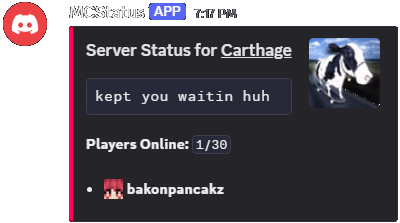 ---
## ⚙️ Configuration
This application expects a `config.json` in the current working directory with the following fields:
| Name | Description |
| :-------------- | :-------------------------------------------------------------------- |
| bot_token | Your Discord Bot token, used to send messages and upload emojis |
| bot_channel | The Discord Channel ID to post the server status to |
| server_address | The Address and Port to the Minecraft Server (e.g. `localhost:25565`) |
| update_interval | Update Interval in seconds, default 60 seconds (1 minute) |
| embed_title | The Embed Title, defaults to `Server Status for {minecraft_address}` |
| embed_color | The Embed Color in Hexadecimal Representation (e.g. #FF005B) |
### Example Configuration
```json
{
"bot_token": "",
"bot_channel": "954501752722444388",
"server_address": "localhost:25565",
"update_interval": 60,
"embed_color": 16711771,
"embed_title": "Status for __Carthage__"
}
```
## 🚀 Startup
Check the Releases tab for a precompiled executable for both Linux and Windows.
---
## ⚙️ Configuration
This application expects a `config.json` in the current working directory with the following fields:
| Name | Description |
| :-------------- | :-------------------------------------------------------------------- |
| bot_token | Your Discord Bot token, used to send messages and upload emojis |
| bot_channel | The Discord Channel ID to post the server status to |
| server_address | The Address and Port to the Minecraft Server (e.g. `localhost:25565`) |
| update_interval | Update Interval in seconds, default 60 seconds (1 minute) |
| embed_title | The Embed Title, defaults to `Server Status for {minecraft_address}` |
| embed_color | The Embed Color in Hexadecimal Representation (e.g. #FF005B) |
### Example Configuration
```json
{
"bot_token": "",
"bot_channel": "954501752722444388",
"server_address": "localhost:25565",
"update_interval": 60,
"embed_color": 16711771,
"embed_title": "Status for __Carthage__"
}
```
## 🚀 Startup
Check the Releases tab for a precompiled executable for both Linux and Windows.